










As network demands continue to increase, choosing the right LAN cable has become essential for ensuring fast, stable, and future-proof connectivity. Each cable category is designed for specific bandwidth, speed, and application scenarios. Below is a detailed comparison to help you make the best decision for home, office, or data center deployment.
Cat5e – Enhanced Basic Performance
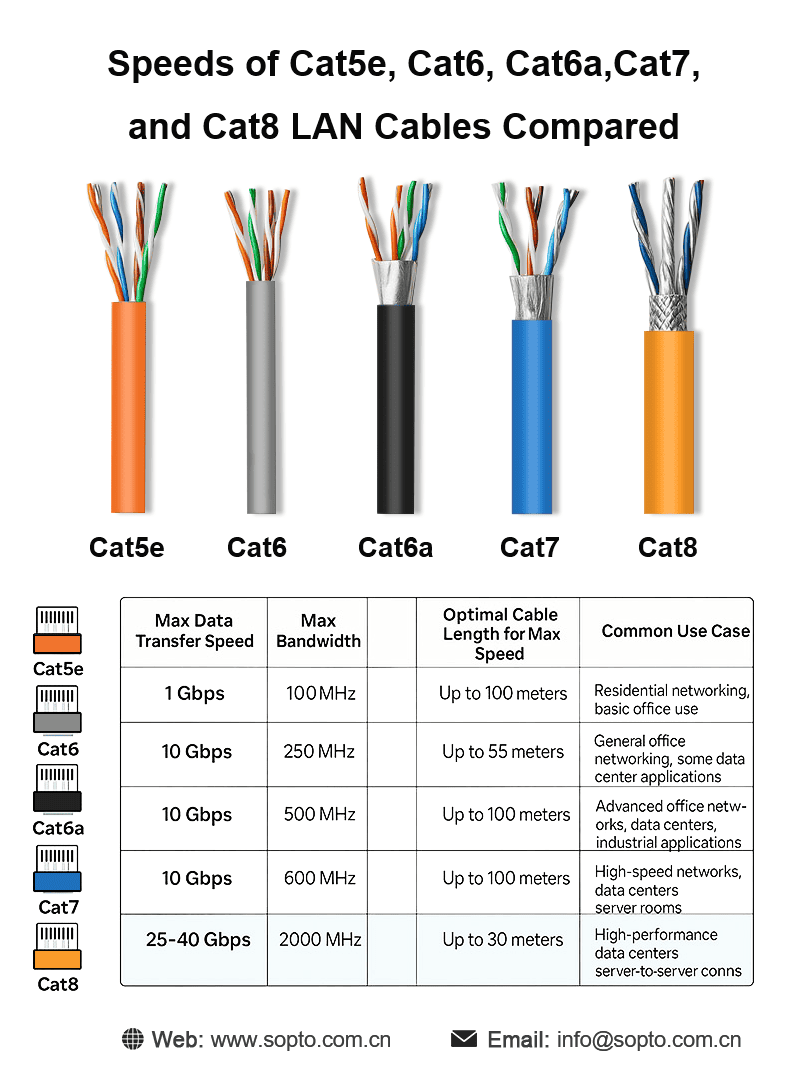
● Cat5e (Category 5 enhanced) is an upgraded version of Cat5, offering lower crosstalk and improved reliability.
● Speed: Up to 1Gbps
● Bandwidth: 100MHz
● Use Cases: Home networks, small offices, basic internet and VoIP
● Pros: Cost-effective, widely used
● Cons: Not ideal for high-speed or future-proof environments
Cat6 – Better Noise Control and Higher Bandwidth
● Cat6 cables include tighter twists and stronger insulation to reduce interference.
● Speed: 1Gbps (10Gbps up to 55m)
● Bandwidth: 250MHz
● Use Cases: SMB networks, HD video streaming, faster LAN applications
● Pros: Improved performance compared to Cat5e
● Cons: Shorter distance for 10Gbps
Cat6a – Enhanced Shielding for Professional Networks
● Cat6a (Augmented Cat6) offers double the bandwidth of Cat6 with robust shielding.
● Speed: 10Gbps up to 100m
● Bandwidth: 500MHz
● Use Cases: Large enterprises, PoE applications, structured cabling
● Pros: Excellent anti-interference performance
● Cons: Thicker and less flexible
Cat7 – High-Performance Shielded Cabling
● Cat7 cables are fully shielded (S/FTP or F/FTP) for environments with strong electromagnetic interference.
● Speed: 10Gbps
● Bandwidth: 600MHz
● Use Cases: Data centers, professional AV systems, industrial automation
● Pros: Very stable and low noise
● Cons: Requires special GG45 or TERA connectors (not standard RJ45)
Cat8 – Ultra-High-Speed for Data Centers
● Cat8 is the latest standard designed for modern high-performance computing and next-generation networks.
● Speed: Up to 25Gbps / 40Gbps
● Bandwidth: 2000MHz
● Use Cases: Data centers, server-to-server connections, high-density racks
● Pros: Exceptional transmission speed and shielding
● Cons: Short transmission distance (up to 30m), higher cost
How to Choose the Right LAN Cable?
● Home & small office: Cat5e or Cat6
● Growing SMB: Cat6 or Cat6a
● Enterprise network: Cat6a or Cat7
● Data center / high-speed computing: Cat8
Sopto provides complete LAN cable solutions for all scenarios—from basic office cabling to high-speed data center infrastructure. Inquiry: [email protected] WhatsApp: https://wa.me/+8618688759008/
Tags : LANcable, Cat6, Cat6a, Cat7, Cat8, Networking, DataCenter, Sopto, EthernetCable, TechSolutions
— END —